Passkeys
How a WebAuthn credential wraps the account vault, what the recovery service stores, and when another browser can restore the same accounts.
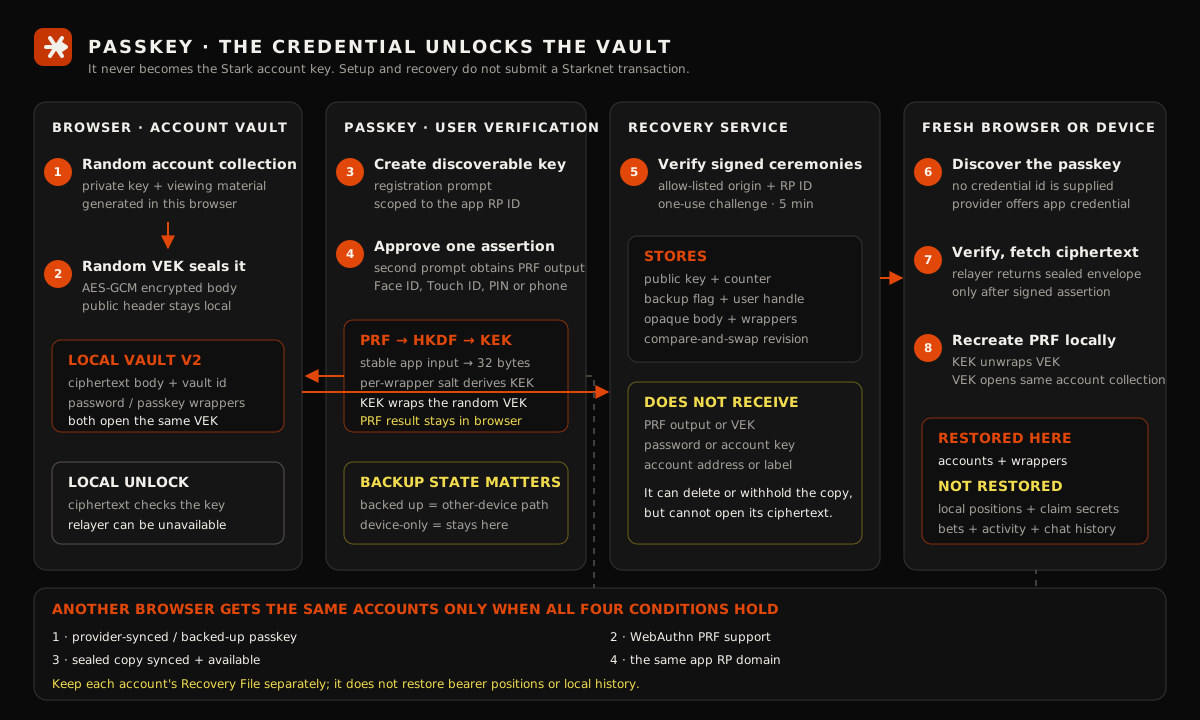
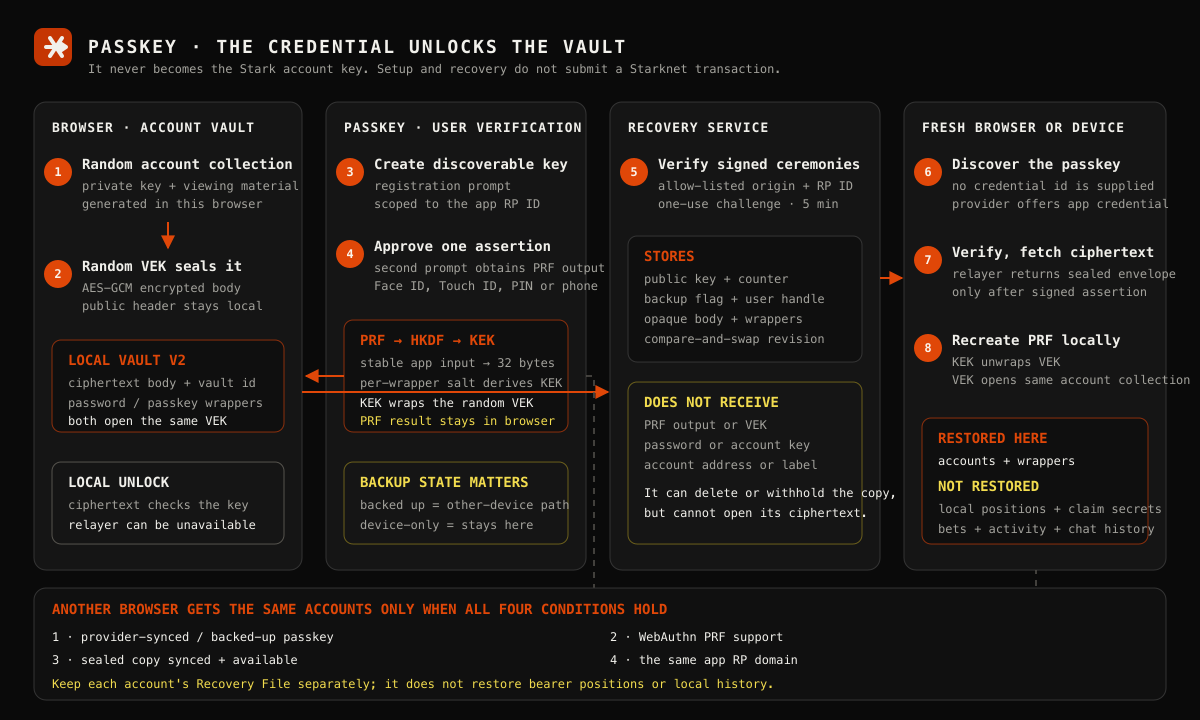
Yes — the same backed-up passkey can restore the same account collection in another compatible browser or device. That sentence has four conditions: the passkey provider must have synced the credential, the new browser must support the WebAuthn PRF extension, the sealed remote copy must be synced and available, and the ceremony must run on the same relying-party domain.
A device-only passkey does not meet the first condition. Passkey restore also brings back the account collection, not every record the old browser kept.
Passkey recovery is not a complete-device backup
Keep the Recovery File and its separate code for every account. Passkey restore does not recover device-local bearer positions, claim secrets, bet history, activity history or Chat history.
Architecture
The three keys are different things
Account key. Generated randomly in the browser. It signs account transactions and opens the pool material this product needs. Passkey input, a credential id, a biometric result and a WebAuthn signature are never used to derive it.
Vault encryption key (VEK). Another random 32-byte value. The browser uses it with AES-GCM to seal the complete account collection. The browser imports it as a non-extractable key and clears the temporary raw bytes after creating or changing a wrapper.
Key-encryption key (KEK). The browser asks the selected passkey to evaluate one stable PRF input. It runs that result through HKDF with a random per-wrapper salt, producing the KEK that wraps the VEK. A password can wrap the same VEK independently, so password and passkey can coexist.
This is why the Passkey is an unlock mechanism rather than an account generator.
Where Passkey appears
During first-run setup, Protect with a passkey sits beside password protection before Generate my key. After setup, it lives under Settings → Security → Passkey, where the row shows whether the provider reports it as backed up, whether the sealed copy is synced, and the Sync now, Add or Remove action that applies.
On a locked browser, Unlock with passkey opens the vault already stored there. On an empty browser, I have a key → Passkey → Restore with passkey starts the different fresh-browser path.
Setup deliberately asks twice
- The registration prompt creates a discoverable WebAuthn credential, scoped to the app's RP ID, and the recovery service verifies its signed origin, RP ID and user verification result.
- A second assertion prompt evaluates the PRF. The browser derives the KEK, wraps the VEK and proves that the new wrapper opens before replacing plaintext or older vault storage.
- The browser writes and reads back the local vault, then uploads the remote sealed copy. If that upload fails, local protection still succeeded and Settings reports the copy as behind.
The PRF result is stripped before the assertion goes to the recovery service. Passkey setup creates no Starknet transaction and pays no chain fee.
Local unlock and fresh-browser restore
Local unlock
The browser already has the encrypted body and its passkey wrapper. It first tries a normal relayer-verified assertion so it can also learn the remote revision. If the recovery service is unreachable, it can fall back to a local random challenge: a correct PRF result unwraps the VEK, and the authenticated ciphertext itself accepts or rejects that key.
Fresh-browser restore
The browser must be empty; the app refuses to overwrite an existing local account store. It asks for a discoverable credential without supplying a credential id. The provider offers a passkey for the app's RP ID, the recovery service verifies the assertion, and only then returns the sealed envelope associated with that public credential.
The PRF is evaluated locally again. The KEK unwraps the VEK, the VEK opens the envelope, and the browser rebuilds its local vault around the same account collection. Neither the PRF result nor an opened account record travels through the recovery service.
Cross-browser behavior, exactly
| Situation | Same accounts available? | Why |
|---|---|---|
| Same browser, local vault present, recovery service unavailable | Yes, for unlock | A local assertion and the authenticated ciphertext are enough. |
| New compatible browser, provider-backed passkey, sealed copy synced | Yes | Discoverable assertion identifies the vault; local PRF opens the returned ciphertext. |
| New browser, device-only passkey | No | The credential cannot appear on another device. Use the Recovery File route. |
| New browser, passkey present but remote copy missing | No | The credential can verify, but there is no account envelope to return. |
| New browser without WebAuthn PRF support | No | It may verify a normal passkey, but it cannot recreate this vault's KEK. |
| Different site or relying-party domain | No | WebAuthn credentials are scoped to their RP ID. |
| Browser already holding another local vault | Refused | Restore will not silently replace an existing identity. |
| Accounts restored, old browser held local positions or Chat history | Accounts only | Those records have separate recovery rules and are not inside this envelope. |
The project records WebAuthn's backup flag and exposes it as Passkey · synced by your passkey provider or Passkey · this device only. Those states follow the WebAuthn distinction between a multi-device and single-device credential; the WebAuthn Level 3 specification also defines the discoverable-credential and PRF behaviors used here.
What the recovery service can and cannot see
| It stores or observes | It does not receive |
|---|---|
| Credential public key, signature counter and backup state | Passkey PRF result |
| Opaque user handle and vault id | VEK or derived KEK |
| Passkey wrapper metadata and opaque AES-GCM body | Password |
| Sealed-copy revision, request IP and timing | Account private key, address or label |
The service can withhold or delete the remote copy, so it remains an availability and recovery trust dependency. Its stored material is not sufficient to open the account collection.
Sync is a merge, not blind replacement
The remote envelope has a monotonically increasing revision. A stale browser receives a conflict instead of overwriting the newer copy. It opens the remote ciphertext locally, unions any accounts and wrappers it was missing, seals the merged collection, and retries once. Nothing is discarded by default; if the conflicting envelope cannot be opened, the operation stops without replacing it.
Use Settings → Security → Passkey → Sync now whenever the row says the sealed copy is behind. That approval creates a short-lived recovery session and uploads the current encrypted collection.
Removal and fallback
Remove deletes the relayer's remote vault record before removing the local Passkey wrapper. If a password wrapper remains, the same encrypted vault stays password-protected. If no wrapper remains, the browser moves the account record back to its unprotected local form, and Settings warns about that consequence before confirmation.
The Recovery File remains a separate per-account route. It is the necessary fallback for a lost device-only passkey and the portable recovery mechanism for account material outside this synced collection model. Continue with the Passkey guide for the exact screens and safe operating steps.